Why Your Product's API Integration Strategy Is Fragmenting Your User Experience (And How to Unify It)
Most products bolt on third-party integrations without a coherent strategy, creating fragmented workflows. Here's how to design integrations that strengthen, not complicate, your core experience.
Aamir Sohail, Co-Founder, XenonDev
, 8 min read
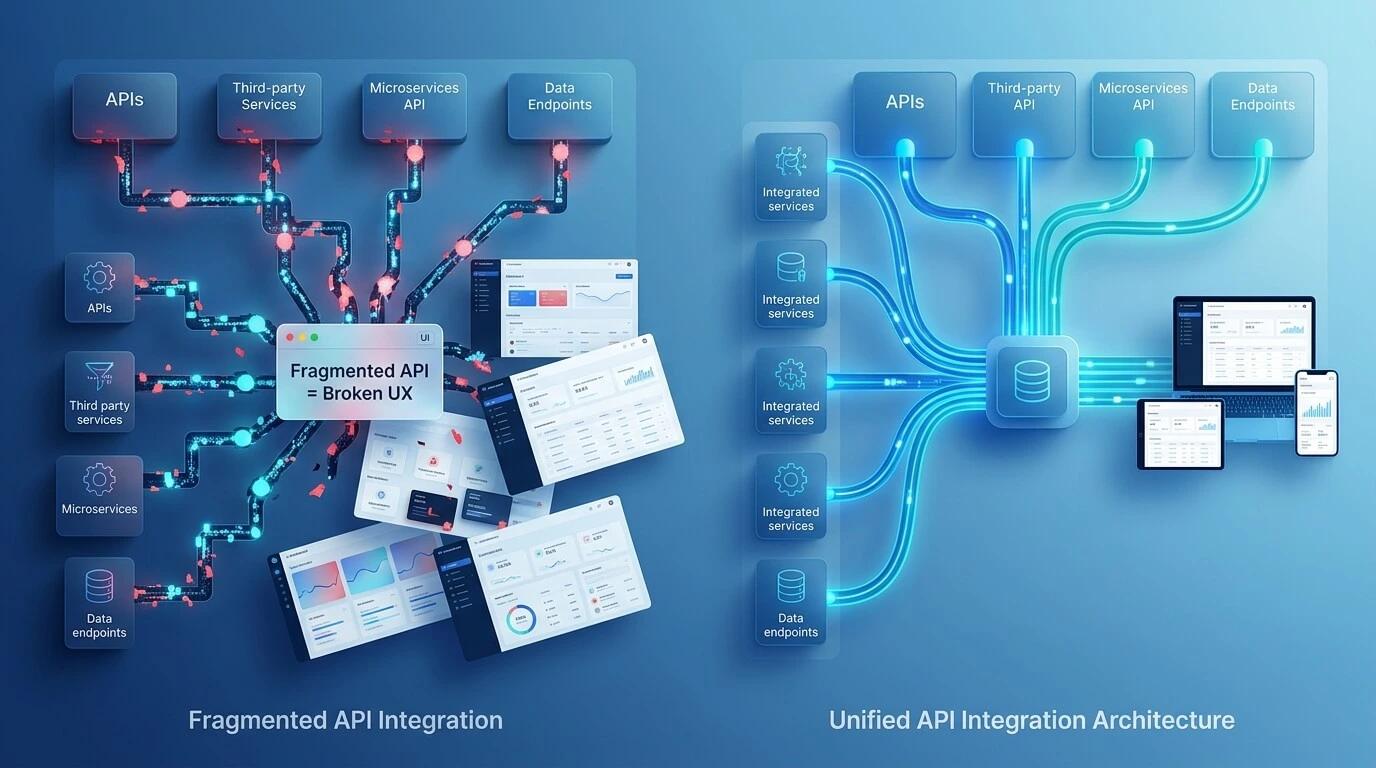
You ship your core product. It works well. Then requests come in: 'Can you integrate with Slack?' 'What about Zapier?' 'We need Stripe integration.' So you build them, one by one, scattered across your product without a unifying framework.
Six months later, your integration stack is a mess. Some integrations are native, some are webhook-based, some live in a separate 'Integrations' tab that users never find. Your team spends half their time maintaining integrations instead of building features. Worse, users experience your product as fragmented—connected to Slack in one workflow, but isolated in another.
The real problem isn't that you're building integrations. It's that you're building them without a coherent strategy. At XenonDev, we've watched founders lose months—and sometimes entire product moats—because their integration layer was designed reactively, not strategically. This post shows you how to think about integrations differently: not as feature requests, but as a core architectural decision that should strengthen your UX, not fragment it.
The Hidden Cost of Reactive Integration Architecture
Most founders approach integrations as a feature checklist. A customer asks for Salesforce sync, you build it. Someone requests Slack notifications, you bolt it on. Each integration is treated independently, without asking whether it fits into a larger system. This reactive approach creates what we call 'integration debt'—technical and UX friction that compounds over time.
Here's what actually happens: You build a Slack integration that sends notifications. Then you build a webhook system for external events. Then a Zapier app. Then a native Salesforce connector. Each one has different authentication flows, different permission models, different data mapping logic. Users now have four ways to achieve the same workflow, and your team has four different codebases to maintain. Engineering velocity drops. Support tickets spike because integration behavior is inconsistent.
The bigger cost is to your UX narrative. Your product originally solved a clear problem in a clear way. But now users see it differently: as a hub for disconnected tools rather than a unified solution. The experience becomes 'your product plus other tools' instead of 'your product that seamlessly extends your workflow.' That's the difference between being a platform and being a platform component—and it directly affects retention, expansion revenue, and how users actually talk about your product.
How to Map Your Integration Hierarchy Before You Build Anything
Before shipping your first integration, you need a framework that answers: Which tools does your user actually need to connect? How do they use them? And critically—which tools should live inside your product, which should live outside, and which should be lightweight bridges?
Tier 1: Native Core Integrations
These are integrations that are so foundational to your user's workflow that they should be native to your product. Think: if your SaaS is project management, connecting to Google Calendar or Slack for task notifications should be first-class citizens in your UI, not hidden in a settings drawer. At this tier, integration UX is product UX. You control the full experience: onboarding flow, permission model, data sync frequency, even the visual design.
Ask yourself: What tool can my users not live without alongside my product? That's Tier 1. For most products, this is 2-4 integrations maximum. More than that and you're building someone else's product. If you find yourself at Tier 1 with seven integrations, you've miscategorized something.
Tier 2: Ecosystem Extensions
These are integrations that add value but aren't core to your narrative. A project management tool might integrate with time-tracking software, expense management, or document storage. Users want these, but they don't define what your product is. At this tier, you build the integration backend but leave the UI lightweight—typically a Settings or Integrations page where users authenticate and configure sync behavior.
The critical decision at Tier 2: Do you build this yourself, or do you use a platform like Zapier or Make as your integration layer? We often recommend the latter. Why? Because Zapier integration is free distribution for you. Users who want to connect your product to tools you haven't built connectors for can do it themselves. You maintain one clean API; Zapier handles the rest.
Tier 3: API-First (Self-Service Integration)
Everything else lives here. You provide a clean REST or GraphQL API with webhooks. Power users and developers can build integrations themselves. You don't maintain them. You don't support them directly. This is how you scale integrations without scaling headcount.
The integration hierarchy is your defense against feature creep. When a customer asks for integration with an obscure tool, you don't say no. You say 'here's our API, here's the documentation.' Most don't build it. Those who do become your strongest advocates because they've invested effort into the integration.
The Unification Layer: One Authentication, One Permission Model
Here's what separates products with coherent integration experiences from products that feel fragmented: a single, unified authentication and permission model. This doesn't mean every integration uses the same protocol. It means every integration asks the same questions in the same way and grants permissions through a consistent mental model.
Example: Slack uses OAuth. Google Calendar uses OAuth. Webhooks are different. But in a well-designed integration layer, all three look the same to your user. They click 'Connect to Slack,' they click 'Connect to Google Calendar,' they configure a webhook—and the UX is consistent. The permission model is consistent: this user can see this data, this integration can write to this workspace, this external system can trigger this action. Behind the scenes, your integration abstraction layer handles the protocol differences. Users never see it.
This is the architectural decision that makes maintaining integrations actually feasible. Without it, your code looks like a series of one-off solutions. With it, you're maintaining a single integration framework that handles multiple protocols. That's the difference between integration hell and integration infrastructure.
Building for Data Consistency Across Integrations
One integration sends data from your product to Slack. Another syncs customer data to Salesforce. A third logs events to an external analytics platform. Now your user modifies data in Salesforce—does it sync back to your product? If so, when? What happens if the sync fails? Who owns that failure?
This is where most integration strategies fall apart. You have unidirectional syncs that create stale data. You have bidirectional syncs that create sync loops. You have integrations that log success but silently fail. From your user's perspective, your product is unreliable. They don't see the integration complexity—they just see inconsistent behavior.
The solution is explicit data ownership and sync strategy. For each integration, decide: Is your product the source of truth, or is the external system? Is this a one-way sync or two-way? What happens on conflicts? How often does it sync? Build a dashboard that shows sync status for every active integration. Show failed syncs explicitly. Let users manually trigger a resync if needed. Make the integration layer transparent, not a black box.
Practical Implementation: Start With One Integration Framework
You don't need to redesign your entire integration stack today. But you should start with one clear integration framework and commit to it. Here's how we typically recommend it: First, audit your existing integrations. Categorize them into Tier 1, 2, or 3. Be honest—most probably shouldn't be Tier 1. Move them down.
Second, build an integration abstraction layer. This doesn't need to be complex. It's a standard way your codebase talks about authentication (whether it's OAuth, API keys, or webhooks), a standard way it handles data transformation, and a standard way it reports status. Use it for all new integrations. Gradually refactor existing ones to use it.
Third, create a single 'Integrations' experience in your product. Not buried in settings. Not scattered across different pages. A cohesive place where users see all connected systems, sync status, and can toggle integrations on or off. This single place anchors your integration narrative. It says: 'This product works with other tools. It's designed to fit into your workflow, not replace it.'
Finally, document your integration strategy. Write it down: which tools are Tier 1, why? What's your API roadmap? How do you decide what to build versus what to support through Zapier? This document becomes your guard rail. It prevents the reactive feature creep that fragments your product in the first place.
When (And When Not) to Build Native Integrations
There's an temptation to build native integrations early because they feel like feature wins. But native integrations are expensive to build and maintain. They lock you into specific tools. They become part of your public commitment—if Slack changes their API, you have to update your integration or face angry users. Think carefully before committing.
Build a native integration only if: (1) it's so core to your users' workflow that you'd build it into your product itself, (2) the external tool is stable and its API is mature, (3) you have users actively requesting it who are ready to buy/expand based on it, and (4) you're willing to maintain it for years. If any of those is false, use Zapier or build an API and let users integrate themselves.
The best integration strategy is actually a non-integration: a clean, well-documented API that developers can build on. You maintain one thing (the API). Users get unlimited integration possibilities. Your product stays focused on what it does best.
Your integration strategy is a product decision. It either strengthens your narrative—'this product fits seamlessly into your workflow'—or fragments it—'this is a hub for a bunch of disconnected tools.' Most founders build integrations reactively and end up with the latter. The founders who win think about integrations architecturally: tiered, unified, and deliberately scoped. Start there. Your users (and your engineering team) will thank you.