How to Automate Business Processes With AI | Complete Guide
Discover how AI can automate business processes, reduce repetitive tasks, improve efficiency, and help businesses streamline operations and drive growth.
Abdul Ahad Akram, CEO & Founder, XenonDev
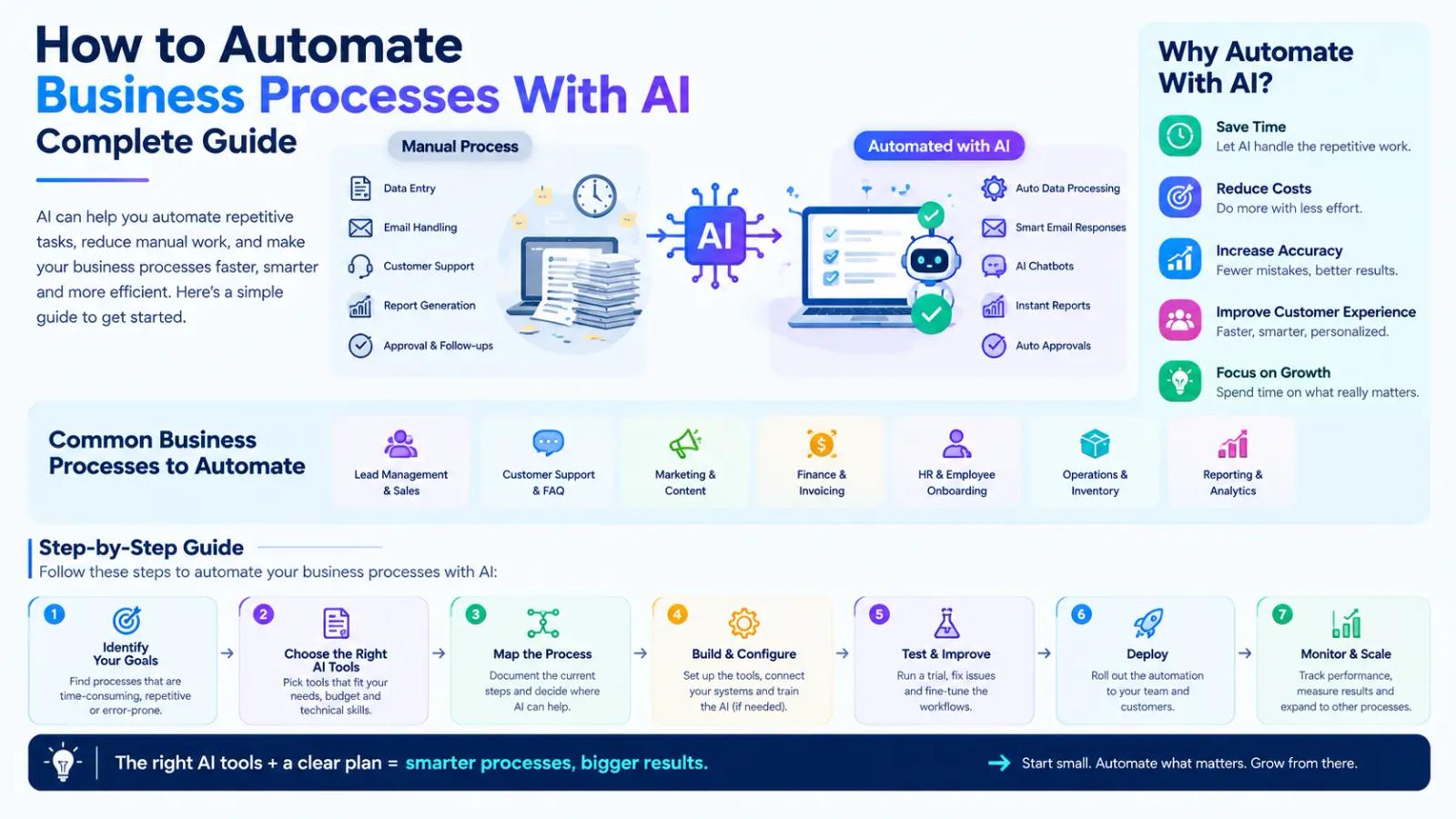
Businesses today are under constant pressure to work better, cut costs, and deliver a better customer experience. But many companies still spend a lot of time on repeated manual tasks like entering data, answering customers, making reports, handling documents, and managing workflows.
AI business process automation helps.
Artificial intelligence lets businesses automate repetitive tasks, analyze information faster, and make better decisions without needing people all the time. From helping customers and managing sales to running internal work and studying data, AI automation helps companies save time and focus on more important work.
But many business owners still ask:
How can you automate business processes with AI, and where should you start?
The answer depends on your business goals, current work processes, and the tasks that take the most time. AI automation is not about replacing people; it is about helping teams work better and get more done.
What Is AI Business Process Automation?
AI business process automation uses artificial intelligence to handle tasks, workflows, and business activities that usually require human involvement. Traditional automation follows set rules, but AI automation can study information, spot patterns, learn from data, and make smart choices.
For example:
A traditional system might send the same automatic email to all customers. An AI system can look at how customers act, understand what they want, and give tailored replies.
AI business process automation can include:
- AI chatbots for customer communication
- Automated data analysis
- Intelligent document processing
- Sales workflow automation
- AI-powered reporting
- Automated decision-making systems
- Business workflow optimization
By using AI automation, companies can work more efficiently and reduce the time employees spend on repetitive tasks.
How Does AI Automate Business Processes?
AI automation works by combining artificial intelligence with existing business workflows. The process usually involves four key steps:
1. Data Collection
AI systems collect information from different sources, including:
- Customer interactions
- Business software
- Documents
- Databases
- Website activity
This data helps AI understand patterns and identify opportunities for automation.
2. Data Analysis and Decision Making
Unlike basic automation systems, AI can analyze large amounts of information and provide intelligent recommendations.
For example:
An AI sales system can identify high-potential leads based on customer behavior.
An AI support system can understand customer questions and provide relevant answers.
3. Task Execution
After analyzing information, AI systems can automatically complete tasks such as:
- Sending responses
- Updating records
- Creating reports
- Assigning tasks
- Processing requests
This reduces manual workload and improves business speed.
4. Continuous Improvement
AI systems can improve over time by learning from new data and user interactions.
This allows businesses to create smarter and more efficient workflows.
Which Business Processes Can Be Automated With AI?
Almost every industry can benefit from AI automation. The best opportunities usually exist in repetitive, time-consuming, and data-heavy processes.
Customer Support Automation
Customer service is one of the most common areas where businesses implement AI automation.
AI-powered customer support solutions can:
- Answer common customer questions
- Provide instant responses
- Manage support requests
- Recommend solutions
- Route complex issues to human teams
AI chatbots allow businesses to provide faster support while reducing pressure on customer service teams.
For companies with large customer bases, AI support systems can significantly improve response times and customer satisfaction.
Sales and Lead Management Automation
Sales teams often spend significant time managing leads, updating records, and following up with prospects.
AI can automate many parts of the sales process, including:
- Lead qualification
- Customer segmentation
- Follow-up messages
- Sales forecasting
- CRM updates
For example, an AI system can analyze incoming leads and identify which prospects are more likely to convert. This allows sales teams to focus their efforts on valuable opportunities.
Marketing Automation With AI
Marketing requires continuous research, content creation, customer analysis, and campaign optimization.
AI helps businesses automate:
- Audience research
- Content planning
- Email personalization
- Customer segmentation
- Campaign analysis
AI-powered marketing systems can analyze customer behavior and help businesses deliver more relevant messages.
However, successful marketing automation still requires a strong strategy and understanding of customer needs.
Data Entry and Document Processing Automation
Many businesses lose hours every week managing documents and manual data entry.
AI can automate:
- Invoice processing
- Document classification
- Information extraction
- Data organization
- Report generation
For example, AI-powered document processing can extract information from invoices, contracts, and forms without requiring employees to manually enter every detail. This reduces errors and improves operational efficiency.
Finance and Operations Automation
Financial and operational processes often involve repetitive tasks that are suitable for AI automation.
Businesses can use AI for:
- Expense tracking
- Financial reporting
- Inventory monitoring
- Forecasting
- Process optimization
AI systems can identify patterns in business data and help companies make better operational decisions.
Benefits of Automating Business Processes With AI
Reduce Manual Work
One of the biggest advantages of AI automation is reducing repetitive tasks. Employees can spend less time on administrative work and focus on activities that require creativity, strategy, and human judgment.
Improve Business Efficiency
AI automation allows processes to run faster with fewer delays.
For example:
- Customers receive faster responses
- Reports are generated quickly
- Workflows move automatically between departments
This improves overall productivity.
Reduce Human Errors
Manual processes often lead to mistakes, especially when handling large amounts of data.
AI automation improves accuracy by consistently following workflows and analyzing information systematically.
Make Better Business Decisions
AI can analyze large amounts of data and identify valuable insights.
Businesses can use these insights to:
- Understand customer behavior
- Predict trends
- Improve operations
- Optimize resources
Improve Customer Experience
Customers expect fast and personalized service.
AI automation helps businesses provide:
- Faster responses
- Personalized recommendations
- Better communication
This creates stronger customer relationships.
AI Automation Tools vs Custom AI Solutions
Businesses usually have two options when adopting AI automation:
Ready-Made AI Automation Tools
Existing AI tools are useful for:
- Basic automation
- Productivity improvement
- Content assistance
- Simple workflows
They are a good starting point for small businesses that want quick implementation.
Custom AI Automation Solutions
Custom AI solutions are designed specifically around a company's processes and goals.
They are useful when businesses need:
- Advanced automation
- Industry-specific workflows
- Software integrations
- AI-powered products
- Greater control over data
For example, a healthcare company may need a customized AI assistant connected with its internal systems, while an eCommerce company may require an AI recommendation engine. In these situations, standard tools may not provide the required flexibility.
How to Implement AI Business Process Automation
Step 1: Identify Repetitive Processes
Start by analyzing your current workflows.
Look for tasks that:
- Take too much employee time
- Follow predictable patterns
- Require large amounts of data handling
These are usually the best candidates for automation.
Step 2: Choose the Right AI Solution
Select AI technology based on your business requirements.
Consider:
- Existing software systems
- Business goals
- Data availability
- Scalability needs
Not every process requires advanced AI. The right solution depends on the problem you want to solve.
Check: AI consulting vs AI development
Step 3: Integrate AI With Existing Systems
AI automation works best when connected with your current business tools.
Examples include:
- CRM systems
- Customer databases
- Websites
- Internal applications
Proper integration ensures smoother workflows.
Step 4: Test and Improve
After implementation, monitor performance and improve the system based on results.
Businesses should measure:
- Time saved
- Cost reduction
- Customer satisfaction
- Process improvements
How XenonDev Helps Businesses Build AI Automation Solutions
Implementing AI automation successfully requires more than choosing a tool. Businesses need proper planning, development expertise, and technical implementation.
XenonDev helps businesses create AI-powered solutions designed around their unique workflows.
Their AI development services include:
- Custom AI applications
- AI automation systems
- Intelligent chatbots
- AI integrations
- Business workflow automation
- AI-powered SaaS solutions
Instead of using disconnected tools, businesses can build AI systems that work with their existing processes and support long-term growth.
XenonDev also helps businesses identify the right AI opportunities through AI consulting, ensuring companies invest in solutions that provide real business value.
Common Mistakes When Implementing AI Automation
Automating Without a Clear Goal
Businesses should first identify the problem they want AI to solve.
Technology should support business objectives, not become the objective itself.
Choosing Too Many Tools
Using multiple AI tools without a clear strategy can create complexity.
A focused automation approach usually delivers better results.
Ignoring Data Security
Businesses should consider:
- Data privacy
- Secure integrations
- Access controls
AI systems should be implemented responsibly.
Conclusion
AI is changing how businesses operate by making processes faster, smarter, and more efficient. From customer support and sales automation to data processing and operational improvements, AI helps companies reduce manual work and focus on growth. It’s not always best to try to automate everything at once. Start by identifying the areas in your business that cause the most headaches, then choose AI tools that can make a real difference.
Whether you want to automate a few simple tasks or build a custom AI system, the right plan can help your business run more smoothly and stay ahead of the competition. With experienced AI development support from XenonDev, businesses can transform repetitive processes into intelligent, scalable solutions built for the future.
Frequently Asked Questions About AI Business Process Automation
What is AI business process automation?
AI business process automation uses artificial intelligence to automate repetitive business tasks, analyze data, and improve workflows.
Which business processes can AI automate?
AI can automate customer support, sales, marketing, document processing, finance, reporting, and internal operations.
Is AI automation only for large companies?
No. Startups and small businesses can also use AI automation to improve productivity and reduce operational costs.
Do businesses need custom AI solutions?
Custom AI is useful when businesses need specialized workflows, unique features, or integration with existing systems.
How long does it take to implement AI automation?
The timeline depends on the complexity of the workflow, required integrations, and the type of AI solution being developed.