You're shipping features for everyone. Your onboarding is identical for power users and casual browsers. Your pricing tiers exist, but you have no real understanding of who actually uses each one. Your product analytics dashboard shows vanity metrics, but the moment someone asks 'which users actually generate revenue,' you go silent.
This is the user segmentation blindness that plagues most product teams. You have segments in your marketing stack—email lists, ad audiences, customer tiers—but your product itself has no spine. There's no systematic way to understand which users are high-value, which are at risk of churning, which need a different experience entirely, and which are just noise in your metrics.
The result? You're optimizing for an average user who doesn't exist. You're making product decisions based on aggregated behavior that masks the truth: different users need different products. At XenonDev, we've watched dozens of founders leave 30-50% of their potential growth on the table because they never built proper segmentation into their product strategy. This post shows you how to fix that.
The Segmentation Blind Spot: Why It Exists and What It Costs
Most product teams default to a one-size-fits-all approach because it's simpler to build, easier to manage, and feels fair. Every user sees the same interface, gets the same onboarding flow, and is funneled through the same feature set. This works until it doesn't—usually around the time your user base becomes diverse enough that different cohorts have completely different needs, but your product has no mechanism to detect or respond to that variance.
The cost is compounding. A power user who should be spending 4 hours per week in your product wastes 45 minutes daily navigating features designed for beginners. An enterprise customer needs role-based access controls you never built, so they stay in spreadsheets and never fully adopt you. A small business owner churns after two weeks because your pricing assumes they're a team, not a solopreneur. Meanwhile, your product metrics show 'average engagement' or 'average retention,' which tells you nothing about which users are actually valuable and which are just inflating your user count.
We've seen this play out in client work repeatedly. A B2B SaaS platform was hitting a wall at $500K ARR. Their retention looked 'good' at 85% annually until we segmented by company size. Enterprise accounts had 95% retention; SMBs were at 60%. They'd been dumping marketing spend into SMB acquisition while enterprise customers—3x the LTV—were neglected. Another founder realized only 12% of their users were actually using the core feature that generated all the revenue, but since there were no segments in the product, they couldn't build a funnel to move the other 88% into activation.
Building a Segmentation Framework That Sticks
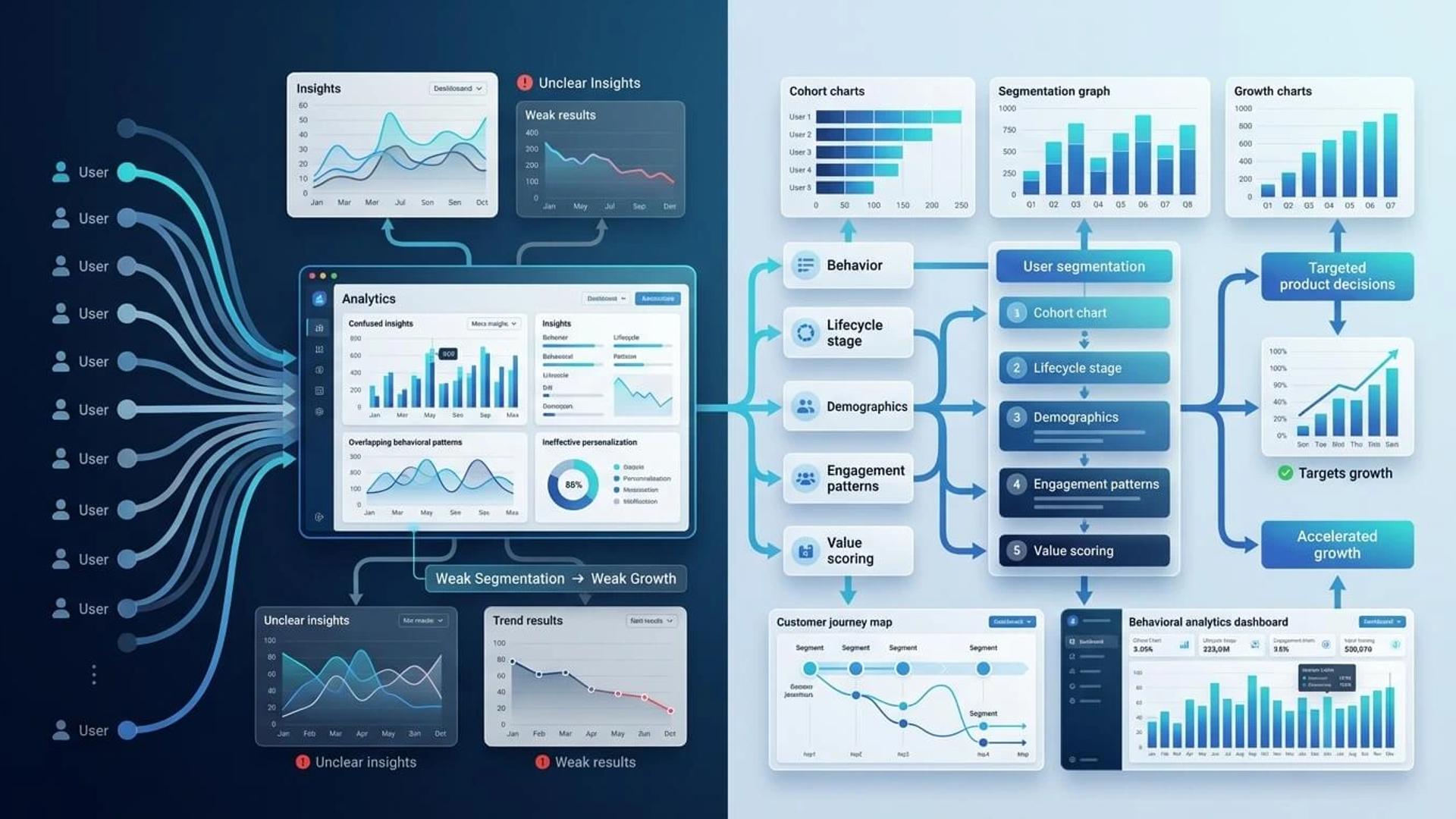
Segmentation isn't about creating marketing buckets—it's about systematically identifying behavioral and value-based groups within your user base and designing different product experiences for them. The framework has three layers: identification, measurement, and activation.
1. Identify Your Segments Based on Value, Not Demographics
Start by asking: who are the users that generate the most revenue, expansion, or referrals? Who are the users most at risk of leaving? Who are the users who barely engage? Don't segment by 'company size' or 'industry' first—those are proxies. Segment by actual behavior and value contribution. Look at your product analytics and identify the top 10-20% of users by revenue, engagement, or whatever metric maps to your business model.
Then reverse-engineer what makes them different. Do they sign up with a work email or personal? Did they come through a specific marketing channel? How long did it take them to reach their first key action? What features do they use most? Are they part of larger organizations? Once you find the pattern, you've found your high-value segment. Repeat for your at-risk segment (users who show early activation but churn by month 3) and your low-engagement segment (users who log in but do very little).
Practically, this means setting up queries in your analytics tool (or building them if you're early) that answer: 'What do high-value users do in weeks 1-4 that low-value users don't?' Run a cohort analysis comparing signup-to-first-feature-use speed, feature adoption breadth, and time spent. Look for discontinuities. These patterns become your segmentation criteria.
2. Instrument Your Product to Measure Segments in Real Time
Once you've identified segments, you need to instrument your product so that every user is automatically classified. This requires event tracking that goes beyond page views and button clicks. You need to capture intent: 'Did this user complete the primary workflow?' 'Did they integrate with an external tool?' 'Did they invite team members?' 'Did they visit the pricing page after using the product for 10+ hours?'
Set up a properties system where each user has a segment tag that updates based on their behavior. For example: 'segment: power_user' if they've completed 20+ workflows in a month, 'segment: at_risk' if they were active for 3 weeks then silent for 7 days, 'segment: explorer' if they've logged in 3+ times but never completed the primary action. This tagging should be automated in your backend or through a product analytics platform like Amplitude or Mixpanel.
Build a segment dashboard visible to your entire team—not just product. Show: how many users are in each segment this week, churn rate by segment, revenue by segment, feature adoption by segment. Make it impossible for anyone to ignore the fact that your 'average' metrics are hiding dramatic differences between user groups.
3. Activate Segments Through Personalized Product Experiences
Now that you know who your segments are and can measure them, you personalize the product experience. Power users get an advanced menu with workflow automation tools. Beginners see a simplified onboarding path focused on the single core action. At-risk users trigger a check-in email with a help resource relevant to where they stalled. Enterprise users see role-based access controls and audit logs.
This doesn't require massive engineering work upfront. Start small: segment your email campaigns by segment, not just 'users who signed up 7 days ago.' Send onboarding emails targeted to power-user behavior patterns. Use a feature flag to show advanced settings only to power users. Set up a Slack webhook that alerts your success team when an enterprise customer hasn't logged in for 14 days. Build one or two segment-specific flows before you build ten.
The key is velocity: get a segmentation system running in weeks, not months. Use existing tools—feature flags, email marketing, in-app messaging—to activate against segments before you build bespoke features. Validate that your segments are real and that different treatments actually move the needle before you invest engineering resources into deeper personalization.
Concrete Segmentation Playbooks by Business Model
The right segments differ dramatically by business model. Here are starting templates for the most common SaaS archetypes:
B2B SaaS (Team Collaboration / Workflow Tools)
Segment by team adoption: 'Founder user' (account owner, high engagement, daily active), 'Team adopter' (invited by founder, uses 2+ features, likely to expand), 'Inactive team member' (invited but rarely logs in), 'Organization admin' (manages billing and users, different UI needs). Your segmentation strategy should focus on which team member segment matters most for expansion—usually it's Team adopters who pull their peers in.
Marketplaces / Platforms
Segment by transaction intent: 'Frequent buyer' (weekly+ transactions, uses search/filters heavily), 'Browser' (logs in, searches, but rarely transacts), 'Seller' (lists products or services, different feature needs), 'Power seller' (consistent inventory, manages analytics, needs backend tools). Buyer and seller journeys are fundamentally different—treating them identically tanks both.
Consumer / Creator Tools
Segment by creation intensity: 'Daily creator' (creates 3+ pieces of content weekly, uses advanced features), 'Casual user' (monthly creator, simpler needs), 'Consumer only' (views/consumes but never creates, lowest LTV), 'Pro subscriber' (pays for premium, justify investment here). Your monetization strategy should reflect this segmentation—pro features matter most to daily creators, not casual users.
The 30-Day Implementation Roadmap
You don't need months to build segmentation. Here's how to go from blind to segmented in 30 days:
Week 1—Hypothesis: Spend 3 days analyzing your user base in your existing analytics tool. Pull cohorts of high-revenue users, churned users, and low-engagement users. Manually inspect 10-15 users from each cohort. Document their signup source, time-to-first-action, feature adoption pattern, and any profile data available. By day 5, write a hypothesis document: 'We believe our segments are X, Y, Z because...' Even if you're wrong, you have a testable starting point.
Week 2—Instrumentation: Work with your engineering team to add segment classification logic to your backend. Create a 'user_segment' field in your user table that gets populated by a simple rule set: if total_actions > 50 this month, segment = 'power_user'; if last_action > 30 days ago, segment = 'at_risk'; etc. Set up a segment_updated_at timestamp so you know when the classification changed. This shouldn't take more than 2-3 days.
Week 3—Dashboarding: Create a simple segment dashboard in your analytics tool. Show: count of users per segment, weekly active users per segment, revenue contribution per segment, 30-day churn per segment. Add a table of the top 10 users in each segment so your team can spot-check that the classification makes sense. Make this dashboard a pin in your company Slack channel. Everyone should see it daily.
Week 4—First Activation: Pick one small way to activate segments. Examples: send a different welcome email sequence to power users vs. explorers; use a feature flag to show 'advanced mode' toggle only to power users; set up a Slack alert for your CS team when an at-risk user goes silent; segment your NPS survey by segment to see which groups are actually satisfied. The activation doesn't need to be perfect—it needs to prove that different segments need different treatments.
The 5 Mistakes That Kill Segmentation (And How to Avoid Them)
Mistake 1: Too many segments. You don't need 10 segments. Start with 3-4: high-value, at-risk, low-engagement. Complexity compounds fast—each segment you add doubles your testing burden. Keep it simple until each segment has its own distinct product strategy.
Mistake 2: Segments based on profile data, not behavior. 'Fortune 500 companies' and 'bootstrapped founders' are not segments—they're demographic buckets. Real segments are 'users who complete the core workflow in week 1' and 'users who sign up but never go beyond day 2.' Behavior predicts value; demographics don't.
Mistake 3: Segmentation without activation. If you identify segments but don't change the product experience for them, you haven't actually built anything—you've just created a report. The moment you have segments, you need a product plan to serve each differently.
Mistake 4: Stale segments. If your segment definitions don't change for 6 months, they're wrong. User behavior shifts as your product evolves, pricing changes, and your market matures. Review and update your segment definitions quarterly based on new data.
Mistake 5: Forgetting to prioritize. Not all segments matter equally. Your high-value segment is 10x more important than your low-engagement segment. Allocate product resources accordingly—spend 60% of your roadmap on serving your high-value segment better, even if low-engagement users are 40% of your user base.
Most founders never build real segmentation into their product because it feels complex and abstract. But when you strip away the jargon, it's simple: identify groups of users with fundamentally different needs and behaviors, measure them systematically, and treat them differently. The founders who do this unlock 30-50% more growth because they're not optimizing for a ghost—they're optimizing for the users who actually matter.
If you're ready to stop shipping for 'average users' and start building for the segments that drive your business, start with the 30-day roadmap above. Spend week 1 analyzing your actual user behavior, not your assumptions. We've built segmentation systems for dozens of products—most founders are shocked at what they discover when they actually look.